
I was invited
Join friends or a community
- Install UnityLAN.
- Log in with Discord.
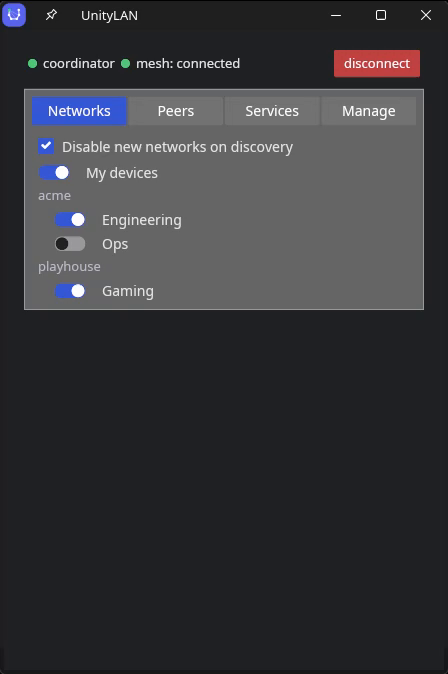
- Your shared networks and peers appear automatically.
Free and open source · AGPL-3.0 · pre-1.0
You already have a group organized in Discord — a gaming community, a homelab crew, a project team. UnityLAN turns those roles into a private LAN. Give a role a network, and everyone who holds it can reach each other's machines directly, as if they were plugged into the same switch. Lose the role, lose access — automatically.
Add Server
Server Name
Bob's survival world
Server Address
mc.bob.unity.internal
DoneCancel
Pick a path now. The architecture and security details are here when you want them.
I was invited
I run a Discord server
/unitylan network add <role>.Just my devices
Two, mostly — and they want different things. Find yours, including the part that might not suit you.
Playing together
Give a role you create — say @regulars — a network, and everyone holding it
can hit the Minecraft or Valheim box by name: mc.bob.unity.internal, typed
straight into the game. No port forwarding, nothing exposed to the internet, no “what's my
IP today?” in chat. Take the role away and they're off the LAN the next time their access
renews.
Instead of: Hamachi or Radmin VPN (a network password that gets pasted in Discord once and lives there forever), ZeroTier, or forwarding a port on your router and hoping.
The catch: games that find servers by scanning the local network won't list yours — that discovery doesn't cross the mesh yet. Anything you can connect to by typing an address works, which is most of them.
Sharing what you host
Share the NAS, Jellyfin, Audiobookshelf, a git server — with exactly the people holding a role. Nothing published to the open internet, no accounts to provision by hand, and no server in the middle to slow it down or read it. What a browser opens gets a real HTTPS certificate: no warning page, and no root certificate to install on everybody's machines. Works the same for a project team that wants a private LAN without standing up an identity provider — the Discord server is the directory.
Instead of: Cloudflare Tunnel or Pangolin (both put your app on the internet behind a login, and the traffic crosses their box or your rented VPS), or a reverse proxy you expose and maintain yourself.
The catch: everyone you share with installs the client, so this suits people on laptops and desktops. It won't reach a TV or a streaming stick — see below, it's the one limit worth checking before you start.
Every online member forms a WireGuard tunnel to every other member they share a network with. Traffic goes directly between peers when the network path allows it; difficult NAT pairs can use an opted-in member as a ciphertext‑only relay. There is no exit server.
An admin registers a Discord role as a network with one slash command. Holding
the role gets you in; a role change in Discord takes effect on the mesh within seconds.
@everyone can't be a network, so nobody joins just by being in the server.
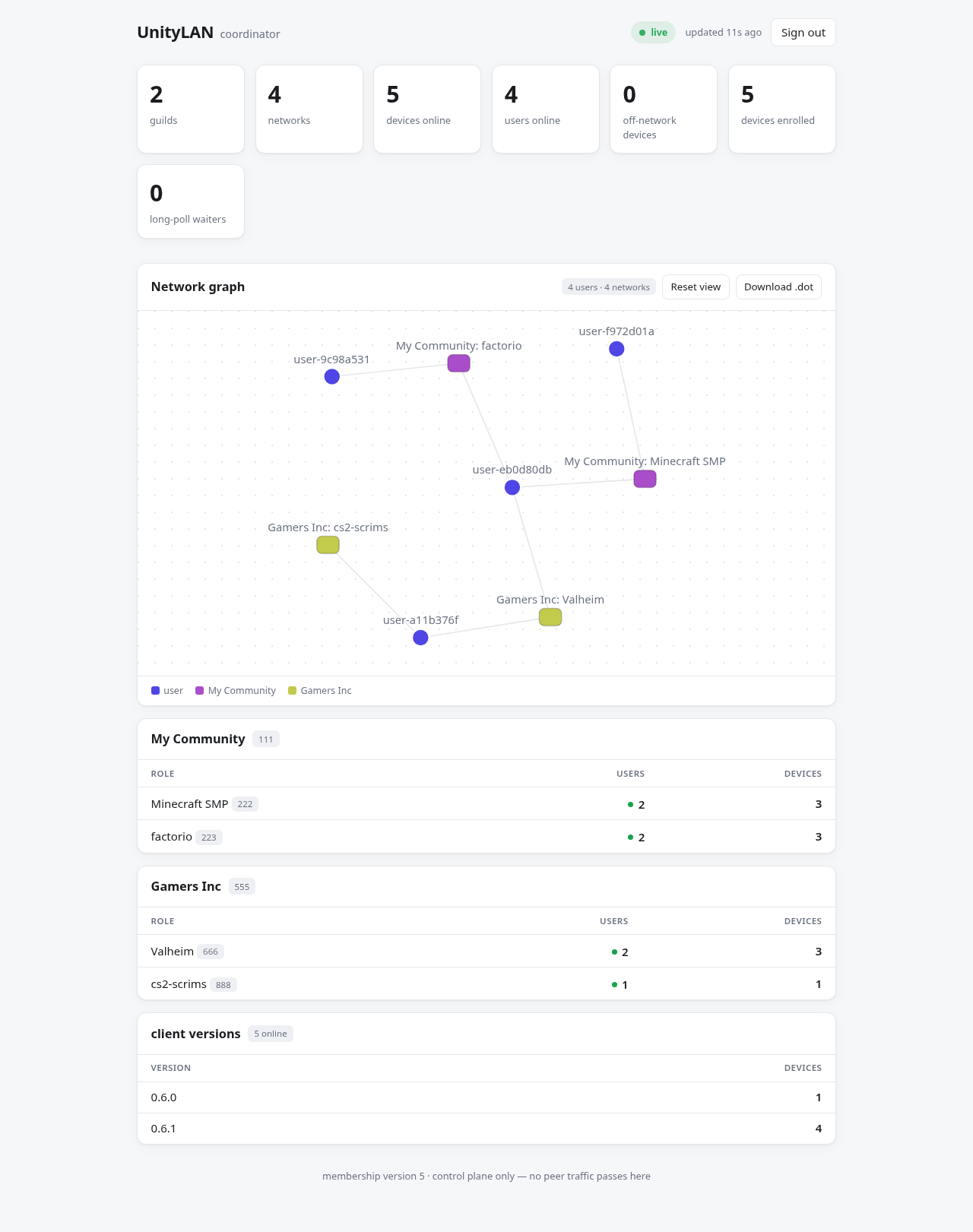
A coordinator authenticates people against Discord, hands out addresses, and helps peers find each other — then gets out of the way. Use the hosted instance or run your own. Either way it carries no traffic and holds no one's private keys.
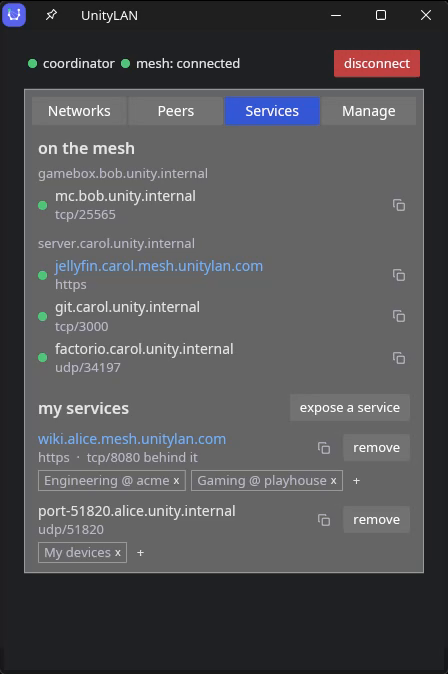
Machines get names like laptop.alice.unity.internal, or just
alice.unity.internal for a member's primary device — instead of raw IPs you
have to remember. So does what you serve: mc.alice.unity.internal for the game
server, jellyfin.alice.unity.internal for the media library. No port numbers to
pass around. Anything a browser opens also answers to a name under a real domain — the
hosted coordinator's is mesh.unitylan.com — with a
publicly-trusted certificate from
Let's Encrypt that your own device obtains and a
built-in proxy serves, so there's no warning page and nothing to configure in the app behind
it.
If you know Tailscale: same shape — control plane plus P2P WireGuard data plane — but the identity source is your own Discord server. No separate UnityLAN account and no proprietary control plane in the middle.
No server required
You don't need a Discord server — your own or anyone else's. Install UnityLAN, log in with Discord on each device, and they find each other. No network to create, no role to grant, nothing for an admin to approve.
Your devices get the usual names and are reachable from each other and nobody else — a stranger who signs in the same way sees nothing of yours. Join a community later and nothing changes: same address, same names, same tunnels. The community's networks simply appear alongside them.
The 60-second version.
Invite the hosted bot, or self-host your own. It holds an independent Ed25519 signing key for each Discord server it serves, so every server has its own trust anchor and compromise of one cannot forge membership in another.
A privileged background engine plus an unprivileged desktop app.
A token that cryptographically binds this user + this device + this IP + this WireGuard key to your Discord server. It can't be forged without that server's signing key, and it expires — so it must be continually re-earned.
Each peer checks the attestation against the pinned key for the server it names. From here the data plane is pure peer-to-peer.
No gossip flood, no always-on connection to babysit. A role change bumps that server's version and every affected client re-syncs at once; clients in unrelated servers stay parked.
The design goal throughout is decentralization. Once tunnels are up, peers hand each other the coordinator's freshly-minted attestations directly over those tunnels — so if your path to the coordinator breaks while your peers still have one, your mesh keeps running indefinitely. The coordinator itself going down is a different case: nothing new gets minted, so credentials lapse at their TTL (30 minutes by default) and tunnels close. A mesh rides out a coordinator restart, not a sustained outage — and enrollment and finding peers you've never met need it either way.
The coordinator never sees your traffic and never holds a peer's private key. WireGuard keys are generated on each device and stay there.
The coordinator generates its own signing key for each server it serves — independently, on first use. Clients pin that key on first contact and verify every peer against it, so a compromised one's blast radius is a single server, never across servers.
Attestations are short-lived and reissued on a TTL, so taking a Discord role away takes mesh access with it. No peer can extend another's credential — only the coordinator mints — so a removed member drops off when theirs lapses, whether or not anyone can reach the coordinator at the time.
Joining a network does not open your box up. The engine installs a host firewall that drops all inbound on the mesh interface except what you explicitly share — a peer can ping you and nothing else. Your regular LAN and localhost traffic is never touched.
The first group are mesh VPNs — same family as UnityLAN, different answer to one question: who decides who's on the network? The last two solve the neighbouring problem, putting a web app in front of people without a client, and are here because that's the other thing people arrive wanting.
| Who decides who's in | Control plane | Data plane | |
|---|---|---|---|
| UnityLAN | A Discord role you already maintain | Open source; self-host it or use the hosted one. Carries no traffic either way | WireGuard, direct peer-to-peer; hard NAT pairs fall back to an opted-in member as a ciphertext-only relay |
| Tailscale | An SSO identity (Google, GitHub, Microsoft…) plus an ACL policy file | Vendor-hosted and closed source; self-hosting means Headscale, a third-party reimplementation | WireGuard, direct peer-to-peer with vendor-run DERP relays as fallback |
| NetBird | Your identity provider over OIDC, plus policy rules | Open source; self-host or use their cloud | WireGuard, direct peer-to-peer with a relay fallback |
| ZeroTier | Manual approval of each device in a network controller | Vendor-hosted controller; self-hostable | Its own layer-2 overlay, not WireGuard |
| Hamachi / Radmin VPN | Whoever has the network's password | Vendor-hosted, closed source | Proprietary, and leans heavily on the vendor's relays |
| Cloudflare Tunnel | A Cloudflare Access policy — an email list, your SSO, or a one-time PIN | Vendor-hosted and closed source; free at small scale | Not a mesh. Every request crosses Cloudflare's network, where TLS is terminated — so they can read what passes through |
| Pangolin | Users and roles in its dashboard, or your own identity provider over OIDC | Open source (AGPL, with a paid tier); you host it — on a VPS with a public IP, which is required | Not a mesh. A reverse proxy on that VPS carries the traffic; visitors need nothing installed, which is the whole point of it |
If you just want to share a web app. Cloudflare Tunnel and Pangolin are built for exactly that, and they beat UnityLAN on one thing that may decide it: your visitor opens a link and installs nothing — so it works on a TV, a games console, a borrowed laptop. The trade is that the traffic goes through someone's box (Cloudflare's, or a VPS you rent and keep patched), and the app ends up published on the internet behind a login. UnityLAN never publishes it at all, and no third machine sees the bytes — but everyone who wants in needs the client. Pick on that, not on features.
Where they're ahead. Tailscale and NetBird are mature products with macOS and mobile clients, audited code, real ACL tooling and actual support behind them. UnityLAN is pre-1.0, Linux and Windows only, and maintained by one person. If you need something that just works on every device your group owns, pick one of those — genuinely.
On par. Names and publicly-trusted HTTPS on mesh addresses work
the way you'd expect coming from Tailscale — with the domain being one you own (or the hosted
mesh.unitylan.com), the certificate obtained by your own device, and a built-in TLS
proxy so the app behind it needs no TLS setup. How that works.
Where UnityLAN differs. Membership comes from a Discord server you already run, so there's no separate directory or UnityLAN account to maintain. The trust anchor can be yours — self-host and the signing key never leaves your box. And the control plane is open source end to end, so the hosted instance is a convenience, not a lock-in.
Compared July 2026 from each project's public documentation, on architecture rather than pricing or limits, which change. Spot something wrong or out of date? Tell us and we'll correct it.
Read this before you install
Being upfront so you can decide before installing.
100.64.0.0/10 range, and Tailscale's firewall rule drops
it on interfaces that aren't Tailscale's own — blackholing mesh traffic while peers still look
connected. On Linux, the engine detects that rule and narrowly exempts the mesh interface; this
compatibility behavior is enabled by default. On Windows there's no workaround yet.
More.Free, and packaged installs already point at the hosted coordinator — there's
nothing to configure. Linux and Windows on x86-64 only — no ARM builds yet, so a
Raspberry Pi means building from source. After installing, log in with Discord from the app (or
unitylan-engine login on a headless box).
The unitylan-desktop package pulls in the engine, CLI, and app.
sudo apt install ./unitylan-desktop_*.deb
sudo systemctl enable --now unitylan-engineRun the .msi. The wizard installs the engine and app, bundles the WireGuard
driver, registers and starts the service, and offers to open the app when it finishes.
Engine and CLI only, no graphics libraries. Mint a one-time key in Discord with
/unitylan enroll, then hand it to the engine — no browser on the box.
sudo unitylan-engine --token unl_… runSHA256 checksums ship with every release, and auto-updates are verified against
a dedicated release key whose private half stays offline — separate from the keys that sign
membership, so neither can stand in for the other. Prefer to build it yourself? It's a Rust
workspace —
cargo build --release.
Before you click invite
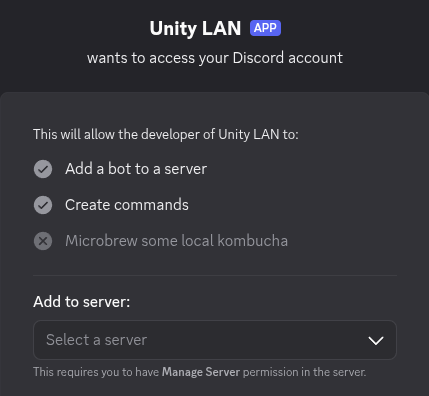
Two scopes and zero permissions requested: join the server, register the
/unitylan slash commands. It asks for nothing to post, moderate, kick, or manage —
in Discord's permission system, it has no more server permissions than @everyone
does.
The running bot subscribes to Discord's server and member events, plus the interactions that carry slash commands. Member events are how a role change reaches the mesh within seconds. It does not request message-content access, so Discord does not deliver message text to it.
Inviting it takes Manage Server, and so does registering a role as a network — a member who merely holds the role can't hand it out to others.
For admins
Easiest — use the hosted instance. A canonical coordinator and bot is up
and free to use, run by the project's maintainer —
gtosh4 on GitHub, tosh on Discord. Invite
the bot to your server, run /unitylan network add <role>, and you're done.
It issues HTTPS certificates under mesh.unitylan.com, so
anything your members serve to a browser works without a warning page. You're trusting that
instance to gate access to your mesh; it still never sees your traffic or your keys.
Full control — self-host. One container. You'll need a Discord app with a bot token and somewhere to run it behind HTTPS.
No. There's no exit node and nothing is proxied — your default route is untouched. Only traffic addressed to another mesh member goes into a tunnel; everything else leaves your machine exactly as it did before.
Not unless you let them. The engine installs a host firewall that drops all inbound on the mesh interface except the ports you explicitly share — a peer can ping you and nothing else. Sharing a port is a deliberate act, and can be scoped to one network's members or to just your own devices. Your regular LAN and localhost traffic is never touched.
No. It isn't on the data path — packets go peer to peer — and it never holds a peer's private key, so there is nothing for it to decrypt even in principle.
Why there's a trusted party at all: Discord gives one user no way to check another user's roles — only a bot can read a server's member list. So membership has to be vouched for by something holding a bot token, and that something is the coordinator. It's a Discord limitation, not a design preference.
The honest caveat that follows: the coordinator generates its own signing key for each Discord server it serves — UnityLAN's key, nothing Discord issues or knows about — and holds it. So whoever runs the coordinator could mint an attestation and place a device of their own into your networks. That device would still land behind your firewall rules like any other peer, and it could not read traffic between existing peers. If that residual trust bothers you, self-host — then the signing key is on your box and nobody else's.
Your Discord user ID and display handle, your device names and their WireGuard public keys, an index that determines your mesh address, a per-device token, and a last-seen timestamp. That's the lot.
It does not store your traffic (it never sees any), and it keeps no record of the addresses your peers connect from — reflexive candidates are brokered in memory to help two peers find each other and are never written down. The coordinator logs operational events like start-up and membership changes, not a per-request access log.
On Linux, yes, automatically. Both use the same 100.64.0.0/10 address range,
and Tailscale installs a firewall rule that drops that range on interfaces which aren't its
own — which silently blackholes every UnityLAN packet while peers still look
reachable. The engine detects that rule and narrowly exempts the mesh interface, rechecking
after every Tailscale restart.
On Windows this isn't handled yet. If you run both there and mesh traffic vanishes while peers show as connected, this is why.
No. Peers negotiate a direct path themselves, hole-punching where the NAT allows it. The hardest cases — CGNAT, symmetric NAT on both ends — fall back to an opted-in member relaying ciphertext it cannot read.
When a direct path exists, traffic takes the same route it would without UnityLAN, plus WireGuard's encryption overhead — so latency is close to a plain internet connection between the same two machines, and there's no server in the middle adding a detour. A pair that ends up on the relay fallback pays whatever the detour through that member costs.
<device>.<you>.unity.internal — so
laptop.alice.unity.internal. Whichever device you mark primary also answers to
the bare alice.unity.internal. Anything you serve can be named too:
mc.alice.unity.internal points at whichever of your machines runs it, so moving
the service later doesn't change the name people type.
Yes, and it can have a real HTTPS certificate rather than a browser warning. Mesh names
end in .unity.internal, which no certificate authority will ever certify — so a
deployment can also configure a domain it owns, under which every device gets a matching
public name (laptop.alice.mesh.unitylan.com on the hosted coordinator) and can
obtain a publicly-trusted certificate for it. Your device runs the whole exchange and keeps
its own key; the coordinator never sees key material. A small proxy alongside the engine then
serves it, so Jellyfin (or whatever you run) stays on plain HTTP and needs no certificate
configuration of its own — and several services can share one machine under different
names.
It's off by default and opt-in per device, for a reason worth knowing: every publicly-trusted certificate publishes its names to public transparency logs, permanently, where anyone can search them. Turning it back off stops renewals but can't unpublish what's there. The app only offers the option once you're actually serving something.
Nothing dramatic. A device stays enrolled and keeps its address until you remove it —
ctl remove for one you no longer have, or uninstall when you're
done with a machine. Removing it returns the address to the pool.
There's one automatic cleanup: if you mesh only your own machines, with no Discord server involved, an address that goes 30 days without connecting is released and you get a fresh one next time you log in.
Yes, and it's meant to stay that way — there are no seats, plans, or limits to grow into. It's a control plane that carries no traffic, so it's cheap to run. If you'd rather not depend on someone else's goodwill, self-hosting is one container.
Best-effort. UnityLAN is a side project, not a company or anyone's day job — there's no SLA, and the hosted coordinator comes with no uptime promise. Questions in Discord get answered when there's time. Everything is open source and self-hostable precisely so you're never stuck waiting on one person.
Using it
Under the hood
Stuck, or want to ask something before you install? The
UnityLAN Discord is where questions get answered —
the maintainer is tosh there. Bugs and feature requests are better as
GitHub issues; security problems go
privately, never in
chat.